WooCommerce Engineering 17–18 min read

WooCommerce Development Cost in 2026: What Should You Actually Budget?

Woocommerce-development-cost-2026-featured

A practical 2026 budget guide for custom WooCommerce stores, plugins, checkout logic, APIs, ERP connections and the engineering work that sits behind the quote.


How much does WooCommerce development cost in 2026?

The shortest accurate answer is: there is no single WooCommerce development price. A standard store assembled from mature extensions is a very different engineering problem from a B2B platform with customer-specific pricing, ERP synchronization, custom checkout rules and business-critical integrations.

For public market context, Codeable’s 2026 WooCommerce cost guide groups projects at roughly $1,500–$8,000 for basic builds, $5,000–$25,000 for mid-level custom work, and $25,000–$100,000+ for complex or enterprise implementations. Those are broad industry planning bands, not a universal rate card and not a Maksut.net quote. See the public benchmark.

WooCommerce’s own pricing model is separate from professional development. The core platform is free and open source; WooCommerce currently lists hosting at roughly $25–$350/month for most stores and many extensions at $29–$299/year, before payment-processing fees and specialist development. See WooCommerce’s official pricing page.

Platform cost is not development cost

A $99 extension license and a $7,500 integration solve different problems. Platform cost pays for software access. Development cost pays for requirements analysis, architecture, implementation, testing, migration, debugging and accountability when the store must behave in a way the standard stack does not provide safely.

Project type Typical planning band What usually sits inside the scope
Small targeted customization $500–$3,000 Checkout fields, template adjustments, one-off business rules, small plugin work, debugging or a contained integration.
Standard professional store $1,500–$8,000 Store configuration, theme implementation, payments, shipping, product architecture and limited customization.
Custom growth-stage store $5,000–$25,000 Custom workflows, bespoke plugins, subscriptions, complex catalogues, APIs, B2B rules, migrations or deeper checkout work.
Complex / enterprise commerce system $25,000–$100,000+ ERP/CRM sync, multi-location inventory, marketplaces, custom pricing engines, high-volume architecture, headless or multi-system orchestration.

How to read the table: the ranges are directional planning bands assembled from current public market benchmarks and real-world scope patterns. A final quote should come from a written specification, not from product count alone.

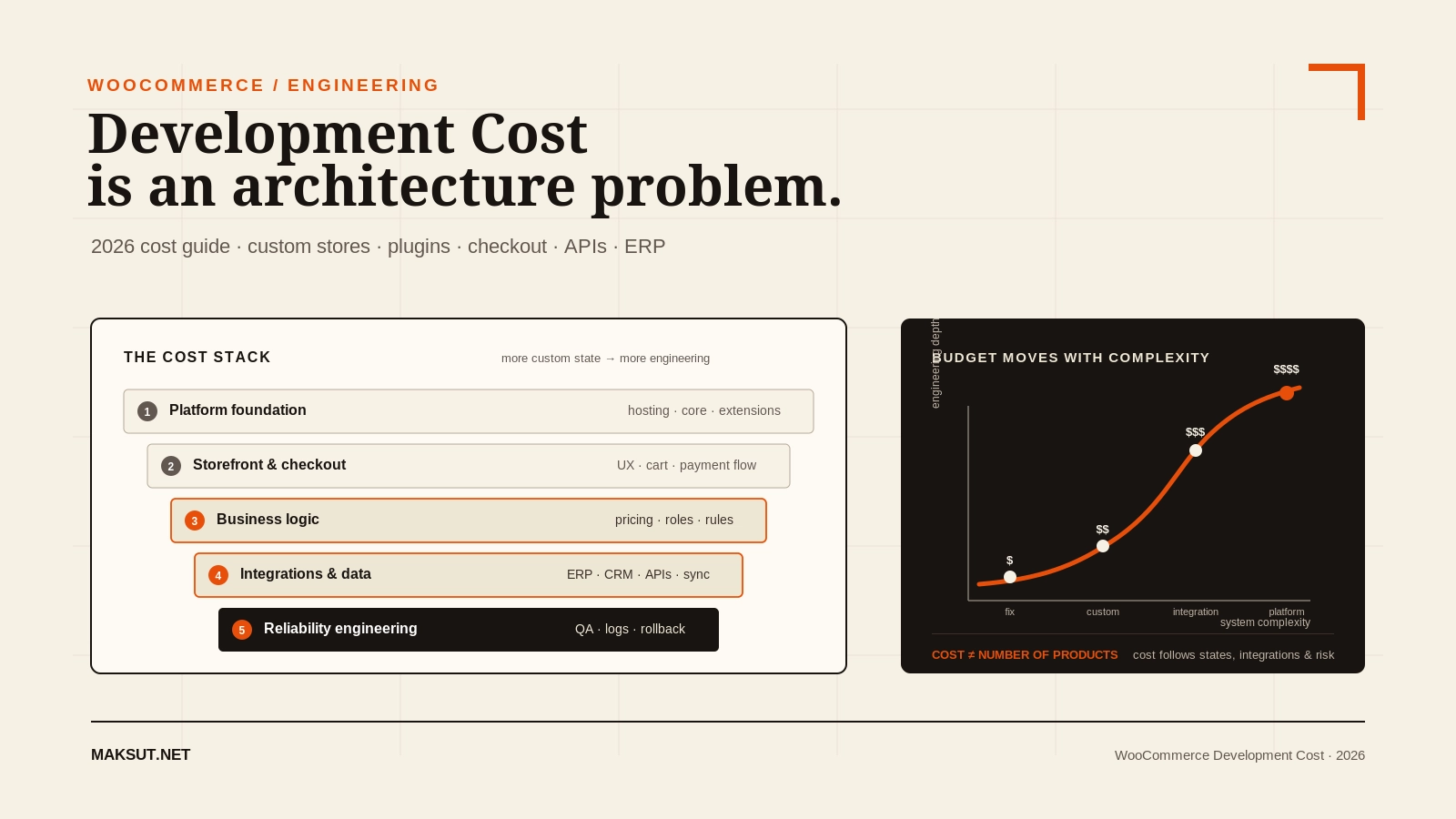
The five layers that create a WooCommerce development budget A layered diagram showing platform, interface, business logic, integrations, and reliability as separate cost components, with custom business logic and integrations creating most budget variance. 1 · Platform foundation Hosting · WordPress · WooCommerce · extensions 2 · Storefront & UX Templates · product discovery · cart · checkout experience 3 · Business logic Pricing engines · roles · approvals · subscriptions · custom workflows 4 · Integrations & data ERP · CRM · WMS · payment APIs · migrations · webhooks 5 · Reliability engineering QA · security · observability · performance · rollback · support Budget variance increases
A WooCommerce quote becomes expensive when the project stops being “a website” and starts becoming a business system.

What actually determines WooCommerce development cost?

Product count is visible, so buyers often use it as the first proxy for complexity. It is usually a weak one. A 20-product B2B store with contract pricing and ERP synchronization can be much more complex than a 5,000-product catalogue imported cleanly from a mature feed.

The largest cost drivers are the parts of the system where business rules meet software state.

1. Custom pricing and commercial rules

Role-based pricing, customer-specific pricing, supplier-currency pricing, quantity breaks, negotiated contracts, margin protection, country rules and channel-specific offers all create additional states that must remain consistent across product pages, cart, checkout, orders, refunds, reports and APIs.

This is the type of problem behind Price Anchor: the visible price is only the surface. A robust pricing system also needs rate validation, rounding, product and variation support, order provenance, failure behaviour and compatibility with the wider WooCommerce pricing pipeline.

2. Checkout customization

A “small checkout change” can mean anything from adding a field to redesigning the commercial decision engine of the store. Complexity rises when checkout includes conditional fields, custom fees, address-dependent rules, B2B approvals, contract acceptance, booking data, payment routing or API calls that must complete without losing the order.

3. Third-party integrations

Integrations become expensive when the external system is slow, inconsistent, rate-limited, poorly documented or authoritative for data WooCommerce also wants to own. The engineering question is not only “Can the API connect?” but:

  • Which system is the source of truth?
  • What happens when one side is offline?
  • How are duplicate writes prevented?
  • How are retries, partial failures and stale data handled?
  • What is logged so a failed order can be reconstructed?

4. Data migration

Migration work is not “export CSV, import CSV” once subscriptions, order history, customer accounts, custom product metadata, coupons, tax logic, multilingual content or legacy plugin data are involved. The cost is driven by mapping, cleaning, rehearsal, verification and rollback planning.

5. Performance requirements

A store that receives 500 visits per month and a store that processes thousands of concurrent sessions do not need the same architecture. Catalogue filters, variation-heavy products, dynamic pricing, cart fragments, Action Scheduler queues, third-party scripts and database growth all change the performance budget.

6. QA and operational risk

A brochure-site regression is inconvenient. A checkout regression can stop revenue. Commerce QA therefore includes more than “it looks correct in Chrome”: payment flows, taxes, shipping, coupons, guest checkout, account checkout, mobile states, webhooks, refunds, order emails, inventory and integration failures all need deliberate testing.

The expensive part is often failure handling

A prototype can prove that two systems exchange data. Production engineering must also define what happens when they do not. Retries, idempotency, logging, alerting, rollback and human recovery paths are frequently the difference between a $2,000 “connection” and a reliable five-figure integration.

WooCommerce development cost by project type

Scope Why the price moves Typical risk
Theme / storefront implementation Number of templates, responsive states, product types, component reuse, accessibility and design-system depth. Visual regressions and WooCommerce template compatibility.
Custom checkout Conditional fields, fees, validation, address rules, payments, shipping logic, B2B approvals. Revenue interruption if state or validation fails.
Custom WooCommerce plugin Admin UI, data model, hooks, REST endpoints, scheduled jobs, compatibility, upgrade path and test surface. Long-term ownership of business-critical logic.
ERP / CRM integration Source-of-truth rules, sync direction, volume, mapping, API quality, retries and reconciliation. Duplicate orders, stock drift or customer-data mismatch.
B2B commerce Customer groups, pricing, quote flow, approvals, purchase orders, restricted catalogues and tax rules. Rules colliding across customer, product and order states.
Performance engineering Traffic, catalogue shape, query load, dynamic data, third-party scripts, infrastructure and caching constraints. Optimizing a benchmark while the buying path remains slow.

Why two WooCommerce quotes can be 5× apart

Two vendors can read the same one-paragraph brief and make completely different assumptions. One quote may cover the visible happy path. Another may include discovery, architecture, staging, automated or repeatable test cases, migration rehearsals, logging, handover and post-launch support.

Why WooCommerce quotes differ Two project quotes start with the same visible feature list. The cheaper quote stops at implementation, while the engineering quote includes architecture, tests, failure handling, deployment and support. Same visible brief “Custom checkout + ERP sync” Feature-only quote ✓ Build visible fields ✓ Call ERP endpoint ✓ Test happy path Unknown: failures · retries · rollback · ownership Engineering quote ✓ Requirements + architecture ✓ Validation + idempotency + retries ✓ Logs + staging + regression tests ✓ Deployment + handover + recovery path More cost — less ambiguity The cheapest quote can be correct when the scope is genuinely simple. The danger is hidden scope, not low price itself.
Compare assumptions and ownership, not only totals. A detailed quote should tell you what happens outside the happy path.

Compare scope before hourly rate

A specialist charging more per hour can still produce a lower total cost if discovery is sharper, rework is lower and the architecture avoids months of plugin conflict. Conversely, a high hourly rate does not guarantee good engineering. Ask what the quote includes and what remains explicitly out of scope.

Freelancer vs agency vs specialist: which is actually cheaper?

Model Best fit Trade-off
General freelancer Small fixes, theme work, plugin setup, clearly bounded tasks. Lower overhead, but complex integrations may exceed one person’s depth.
WooCommerce specialist Custom checkout, plugins, pricing, migrations, debugging, API and operational problems. Higher specialist rate, usually less platform-learning time.
Full-service agency Large redesigns requiring strategy, UX, design, copy, development, PM and multiple disciplines. Broader capacity with higher coordination and overhead cost.
Hybrid team Complex systems where a specialist engineer works with an existing brand/design/marketing team. Efficient when responsibilities are clear; messy when ownership is not.

My own work sits primarily in the specialist / systems-builder lane: custom WooCommerce plugins, pricing logic, checkout flows, integrations and inherited stores that need technical intervention rather than another generic page-builder implementation. See WooCommerce development services and selected project work.

The hidden cost of plugin stacking

WooCommerce’s extension ecosystem is one of its biggest strengths. Custom development should not be the default answer when a maintained, compatible extension already solves the requirement well.

The cost problem appears when a store reaches a point where several plugins are independently modifying the same commercial state: price, cart, checkout, subscriptions, shipping, roles or inventory. At that point you are paying not only license fees, but also for interaction risk.

  1. Start with the business rule

    Write the requirement without naming a plugin: “Wholesale customers receive contract pricing after approval,” not “install a B2B plugin.” This prevents the tool from becoming the architecture.

  2. Check one mature extension first

    If a reputable extension covers 90–100% of the workflow without forcing unsafe overrides, buying is usually better than building.

  3. Measure the adaptation layer

    If three or four extensions are needed and they all intercept the same checkout or pricing events, integration work can exceed the cost of one purpose-built component.

  4. Compare three-year ownership

    Include licenses, update testing, compatibility debugging, custom glue code, migration risk and the cost of replacing abandoned dependencies.

  5. Build only the proprietary layer

    Do not recreate payments, tax engines or commodity features without a strong reason. Custom code should concentrate on the workflow that makes the business different.

Build vs buy is not ideological

If an existing extension is stable, secure and genuinely fits the workflow, I would rather configure it than charge you to rebuild it. Custom development makes economic sense when it removes structural friction, consolidates fragile plugin chains or implements business logic the market does not already solve well.

Example WooCommerce budgets: what changes at each level?

The examples below are not packages. They show how scope tends to change as the budget increases.

Around $3K

Contained scope. Existing store, one clearly defined workflow, limited UI, no major migration.

  • Checkout adjustment or custom validation
  • Small single-purpose plugin
  • One straightforward API connection
  • Targeted debugging / stabilization

Around $8K

Custom operational feature. More business logic, admin controls and test surface.

  • Bespoke WooCommerce plugin
  • Pricing or role logic
  • Custom admin workflow
  • Moderate external integration

Around $15K

Multi-system build. Several workflows interact and operational reliability starts to dominate.

  • ERP/CRM integration
  • Complex checkout + pricing
  • Migration and reconciliation
  • Staging, logs and recovery tooling

$30K+

Commerce platform work. The store behaves like a core business system rather than a standard website.

  • B2B portal or marketplace logic
  • Multiple integrations / source systems
  • High-volume performance constraints
  • Advanced permissions, observability and support

The rule behind the numbers

The budget does not increase because a developer “writes more code.” It increases because there are more states to keep correct, more systems to coordinate, more failure modes to recover from and more business risk attached to regressions.

Real-world scope: what custom WooCommerce work can look like

On recent WooCommerce projects, the visible storefront has often been only one layer of the work:

  • E-commerce renewal: a legacy WooCommerce store rebuilt with a new front end plus a custom multicurrency layer and product-level “call for price” workflow.
  • US commerce build: a full WooCommerce implementation with a custom child theme and a wide template surface rather than a one-page theme reskin.
  • Custom currency product: Price Anchor manages supplier-currency pricing, rate validation, markup, rounding and order provenance as a coherent pricing system.

Those examples are useful because they show why “WooCommerce site” is too vague for a quote. The scope can be a design implementation, a plugin product, an operational integration or all three.

What should be included in a professional WooCommerce quote?

A good quote does not need to be a 40-page legal document, but it should make ambiguity visible. At minimum, I would expect:

  • Business objective: what commercial problem the project solves.
  • In-scope workflows: exact customer/admin/system behaviours.
  • Data ownership: which system owns products, prices, stock, customers and orders.
  • Integration boundaries: APIs, credentials, rate limits and vendor dependencies.
  • Migration scope: what existing data must survive the launch.
  • Acceptance criteria: how “done” will be tested.
  • Deployment: staging, backups, launch sequence and rollback.
  • Warranty / support: what happens immediately after launch.
  • Exclusions: the assumptions that would trigger a change in scope.
A healthy WooCommerce scoping sequence A five-step flow from business rule to system map, failure cases, acceptance tests and final quote. The quote is the last step rather than the first. 1 Business rule What must happen? Who needs it? 2 System map Woo · ERP · CRM Data ownership 3 Failure cases Offline · duplicate timeout · rollback 4 Acceptance Tests · migration Definition of done 5 Quote & milestones Cost follows scope —not the reverse The fastest way to get a bad estimate is to ask for a price before the system boundary is clear.
A reliable quote is the output of scoping. If the number comes before the architecture, hidden assumptions are doing the estimating.

When custom WooCommerce development is not worth it

There are several situations where I would not recommend a custom build:

  • The requirement is already solved well by one mature extension. Buy it, configure it and keep your ownership burden low.
  • The business process is still changing weekly. Prototype the workflow before hard-coding an unstable rule set.
  • The store has no validated demand. Do not spend $20,000 perfecting an operational architecture before proving customers want the product.
  • The requested customization exists only to mimic another platform. Sometimes changing the process is cheaper than forcing WooCommerce to behave like unrelated software.
  • The budget does not include maintenance. Business-critical custom code needs an owner after launch.

This matters commercially. A developer who says “yes” to every custom request can increase the initial invoice while making the store harder to own. The right solution is the smallest architecture that solves the real business constraint cleanly.

Development cost is only part of total WooCommerce ownership

After launch, the store still has hosting, extension licenses, payment fees, monitoring, updates, security, performance work and future development. Those costs should be considered separately from the build.

Cost layer One-time or recurring? Examples
Platform / infrastructure Recurring Hosting, CDN, transactional email, monitoring.
Software licenses Usually recurring Premium WooCommerce extensions, search, subscriptions, shipping, tax tools.
Initial development One-time / milestone Architecture, storefront, custom plugin work, integration, migration.
Maintenance Recurring Staged updates, checkout monitoring, backups, security and incident response.
Growth development Ongoing New workflows, markets, integrations, performance and conversion improvements.

If you run a live store, maintenance should be budgeted as operational risk management rather than optional housekeeping. My current WordPress & WooCommerce maintenance plans separate normal site care from store care because checkout, payments and order integrity need a different monitoring surface.

How to reduce WooCommerce development cost without cutting engineering quality

  1. Write the workflow before choosing plugins. A clean requirement removes speculative implementation time.
  2. Choose one source of truth for every important data type. Product, price, stock and order ownership should be explicit.
  3. Use WooCommerce core and mature extensions for commodity features. Spend custom budget only where your business actually differs.
  4. Provide API documentation early. “We have an ERP” is not integration documentation.
  5. Clean legacy data before migration. Development time should not become manual data archaeology.
  6. Agree on acceptance criteria. A requirement that cannot be tested will be reinterpreted repeatedly.
  7. Keep design and functional scope separate. Reworking checkout UI while business logic is still moving creates expensive loops.
  8. Plan phase two deliberately. Not every useful idea belongs in version one.

The cheapest version-one feature is the one you do not build

Good scoping removes features as often as it adds them. A smaller first release with clean data ownership and extension points is usually cheaper to evolve than an oversized launch full of speculative workflows.

How I scope a custom WooCommerce project

For a serious custom project, I want enough information to answer five questions before giving a confident fixed estimate:

  1. What is the business event?

    Describe the trigger and expected result in plain language: customer places an order, buyer requests a quote, ERP updates stock, supplier price changes, subscription renews.

  2. Which systems participate?

    WooCommerce may be only one node. List ERP, CRM, accounting, WMS, shipping providers, payment gateways, marketplaces and internal tools.

  3. What data moves and who owns it?

    For each entity, define the source of truth and whether synchronization is one-way or two-way.

  4. What can go wrong?

    Offline APIs, duplicate webhooks, rejected payments, partial imports, stale prices and failed jobs need defined behaviour.

  5. What proves the project is finished?

    Turn requirements into acceptance criteria, test states and launch checks before development starts.

If you already have a technical specification, send it. If you do not, a short process description is enough to start. The goal of discovery is not to turn a small project into a consulting exercise; it is to avoid pricing a system that nobody has actually defined.

WooCommerce development cost: decision summary

Use the following rule of thumb:

  • Under $3K: keep the problem narrow and avoid multi-system scope.
  • $5K–$15K: expect custom business logic, a bespoke plugin or one meaningful integration.
  • $15K–$30K: expect multiple workflows, migration, deeper integrations and operational tooling.
  • $30K+: treat the work as commerce-system engineering, not simply a website build.

The range matters less than the reason behind it. If a vendor cannot explain which states, integrations, risks and deliverables create the budget, the number is not yet useful.

Frequently asked questions

How much does a WooCommerce developer cost in 2026?

Rates vary by geography, specialization and project type. Public 2026 market guides commonly place experienced WooCommerce specialists in roughly the $100–$200+/hour range, while project pricing can run from a few hundred dollars for tightly scoped fixes to five or six figures for complex commerce systems. Compare scope and ownership before comparing hourly rates.

How much does a basic WooCommerce website cost?

For professional development, public planning benchmarks commonly place a straightforward WooCommerce build in roughly the $1,500–$8,000 range. Hosting, premium extensions, payment-processing fees, content, branding and ongoing maintenance are separate costs.

Why is custom WooCommerce development expensive?

Custom development becomes expensive when the store contains proprietary business logic, complex checkout states, external integrations, migrations, performance constraints and recovery requirements. The cost comes from keeping many system states correct—not simply from writing more lines of PHP.

Is it cheaper to use plugins instead of custom development?

Usually, yes—when one mature plugin solves the requirement cleanly. Custom development becomes attractive when several plugins must be glued together, when they conflict around the same pricing or checkout state, or when your business workflow is genuinely proprietary.

How much does a custom WooCommerce plugin cost?

A small single-purpose plugin may fit in the low four figures, while a complex plugin with its own admin interface, APIs, background processing, custom data model and broad compatibility surface can move well into five figures. The feature count alone is not enough to estimate it.

Does WooCommerce itself have a monthly platform fee?

No. WooCommerce is free and open source, and WooCommerce says it does not charge a platform revenue share. You still pay for infrastructure, payment processing and any commercial extensions or services you choose.

Should I ask for a fixed price or hourly WooCommerce development?

Fixed pricing works best when requirements and acceptance criteria are clear. Hourly or retainer work is often better for debugging, inherited systems and evolving requirements where the unknowns are the work. A hybrid discovery-plus-fixed-build model can work well for complex integrations.

How do I get an accurate WooCommerce quote?

Send the business workflow, systems involved, data that moves between them, current store URL if one exists, required launch date and any API documentation. A useful quote should identify assumptions, exclusions, milestones and what happens when integrations fail—not only a total price.

Planning a WooCommerce build? Start with the scope, not the plugin list.

Send me the workflow you need, the systems involved and what your current store cannot do. I will tell you whether the cleanest route is an existing extension, a custom plugin, an integration or a larger WooCommerce rebuild.

Discuss your WooCommerce project

Also: WooCommerce Development · Selected work · WooCommerce Care

Share this article

Related posts

Discussion

0 comments

No comments yet.

Have a technical question, correction or a different interpretation? Add to the discussion.

Leave a reply